
Academy / Content & Media
Uploading Media: Albums, the 20 Item Rule and Pricing
Your AI can only sell what you have given it. Here is how uploading works, and the two choices you make each time that decide how well it sells.
Put one shoot in one album, upload at least 20 items, and mark a couple of them free. Your AI builds bundles inside a single album, so a mixed album produces bundles that look random. An album with no free items cannot sell at all, because there is no teaser to put outside the lock.
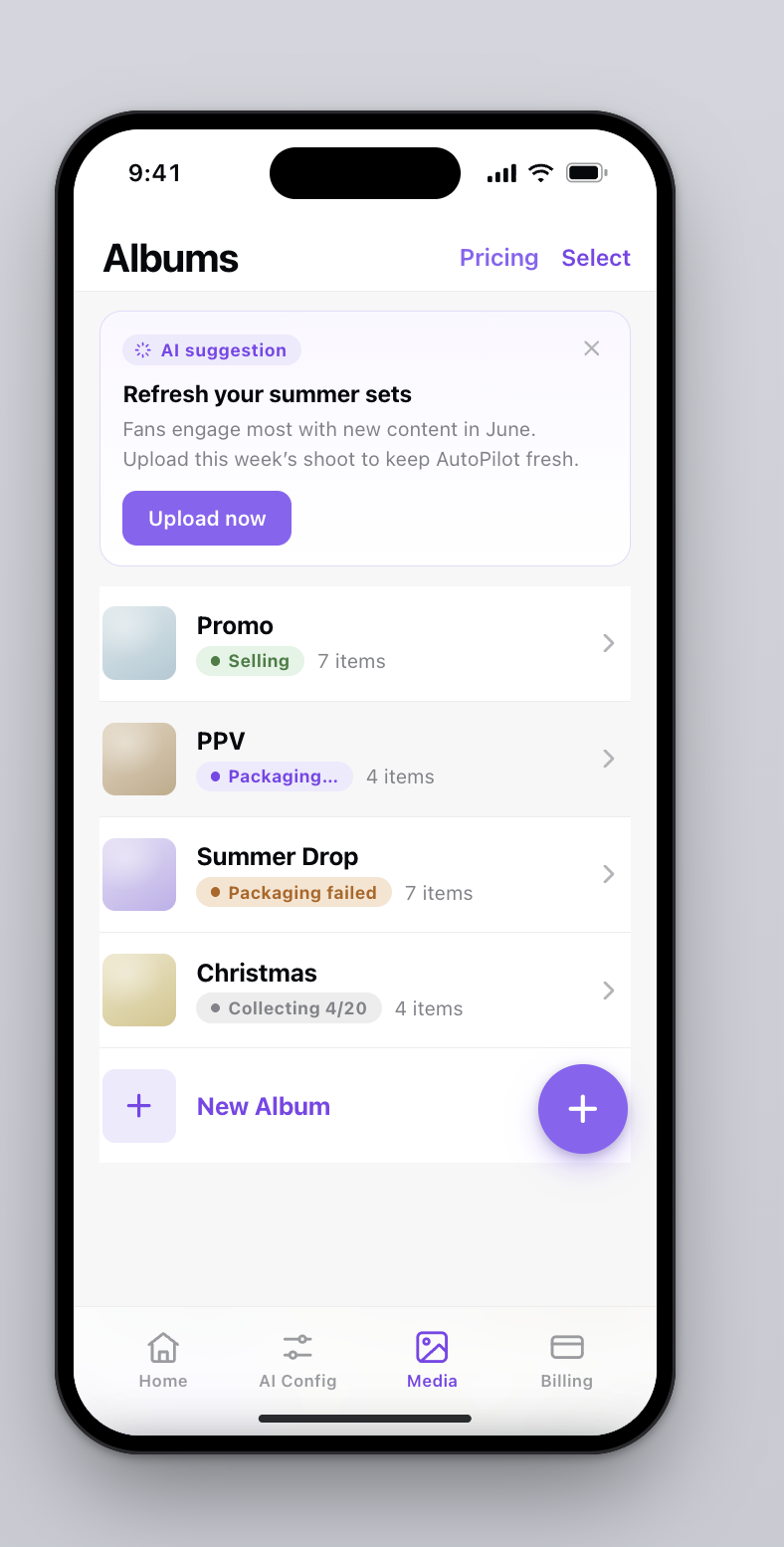
The Media tab is where your AI gets its material. Everything it posts to your feed and everything it sends as a PPV comes out of what is sitting here. An empty or stale library is the most common reason a page underperforms on Autopilot.
How do you get photos in?
Tap the + button on the Media screen. You can pull from your camera roll or shoot something new, select photos and videos together, and send up to 50 files in one go. Uploads keep running in the background, so you can leave the screen.
If most of your content is already on your platform, import straight from your Vault instead.
What are the two choices after you hit select?
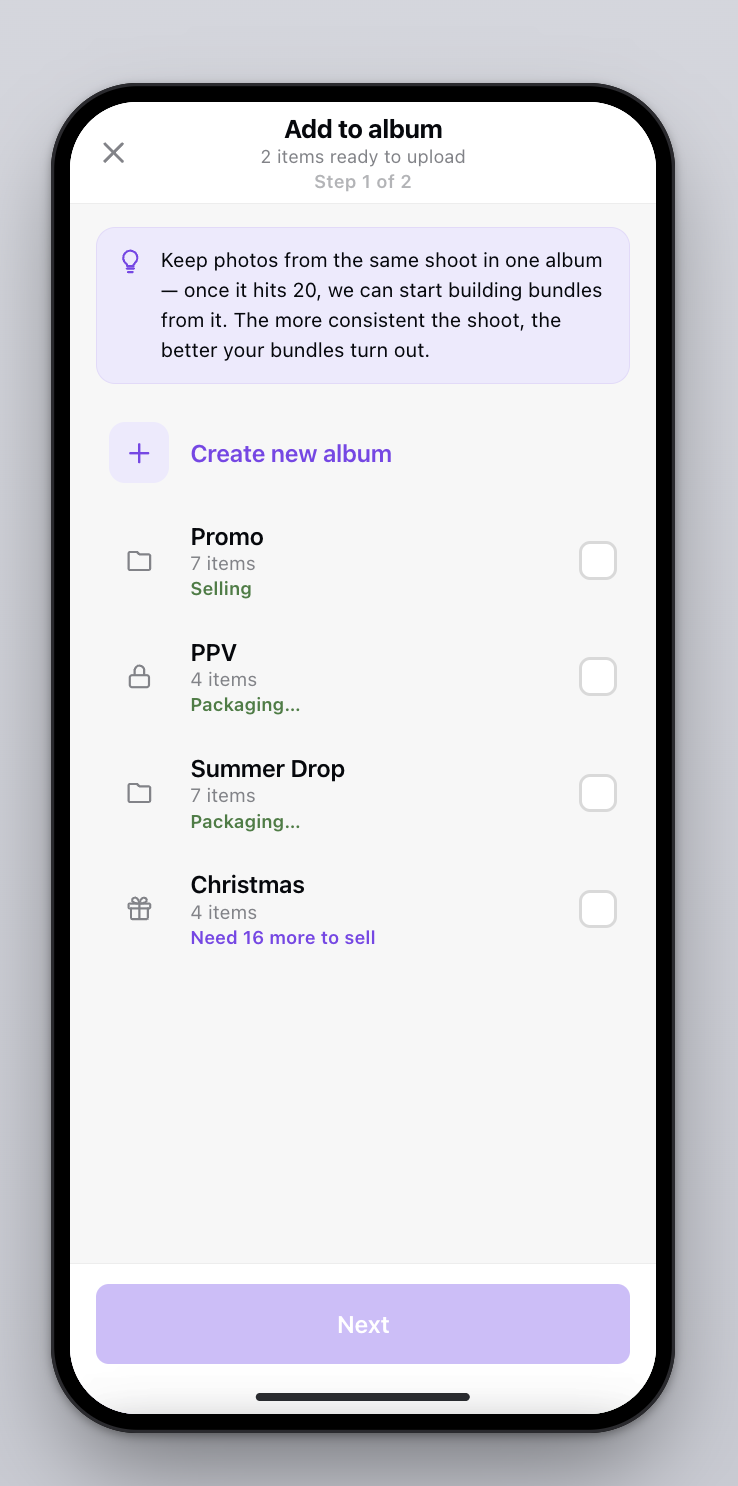
Choose an album
Every upload has to land in an album. Pick an existing one or create a new one on the spot.
This is not filing for the sake of filing. Your AI builds bundles within a single album and never mixes content across albums. An album that holds one coherent shoot produces bundles that look like a set. A dumping ground produces bundles that look random.
Mark each item free or paid
Free and paid do different jobs, and a bundle needs both.
- Free items become the teaser, the preview a fan sees outside the locked message.
- Paid items are what sits behind the lock.
Everything defaults to Paid. Use Mark all Free or Mark all Paid for the batch, then tap individual photos to change them. You can flip any item later from its detail page.
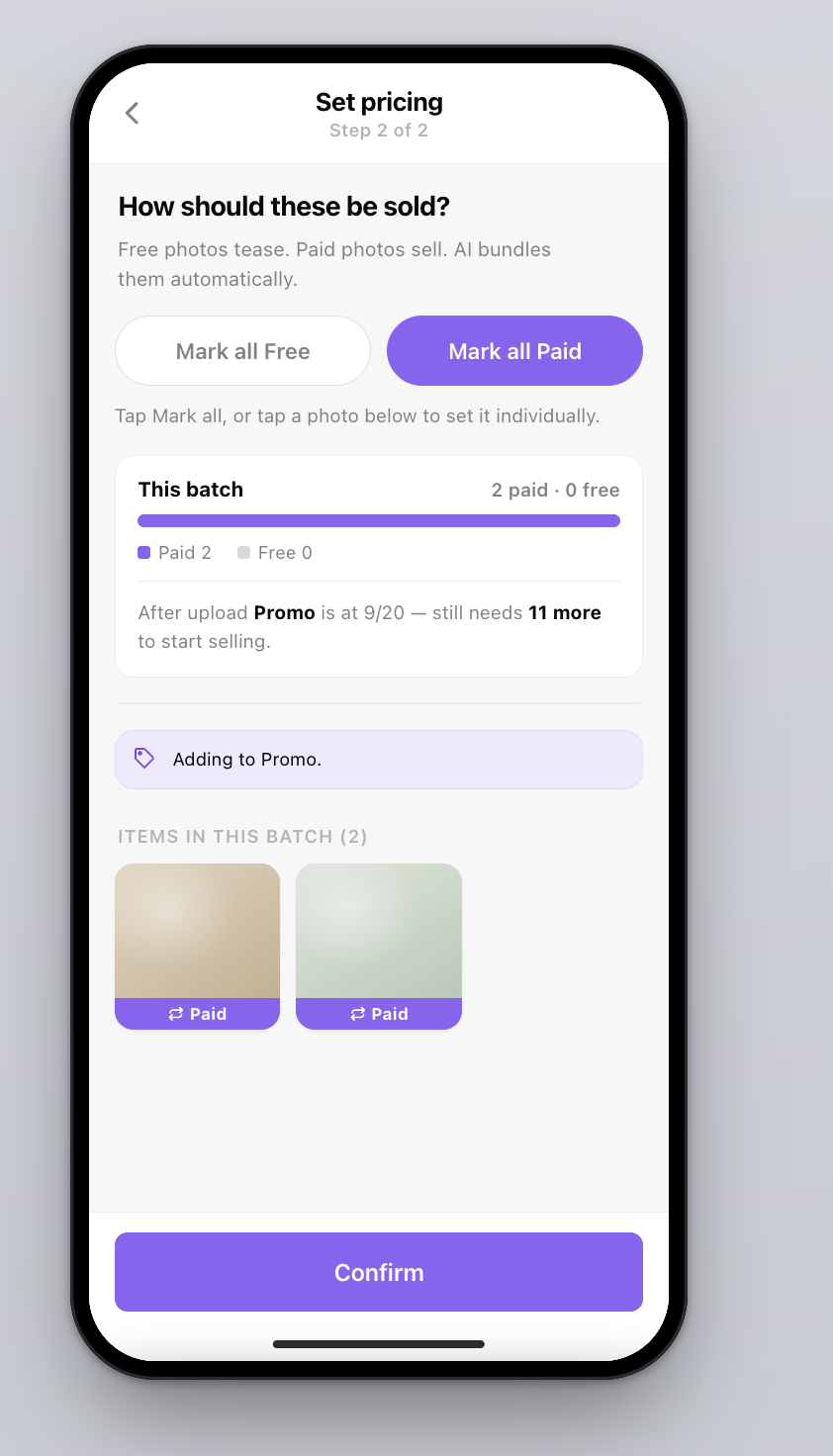
Without at least one free item to use as a teaser, your AI cannot assemble a bundle from that album. It will not fall back to sending something worse. Leave a couple of softer shots marked free in every shoot.
What is the 20 item rule?
An album needs 20 items before your AI starts building bundles from it. Below that, everything still uploads and files normally, it is just not in the running yet. That is why a half filled album shows something like "Need 16 more to sell".
The threshold exists because bundles are chosen, not scraped. With 20 or more items to work from, your AI can pick a set that hangs together by scene and outfit, put one or two of your strongest shots at the top, and leave the rest in reserve. With eight, it is just sending you back your own folder.
What do the album statuses mean?
Under 20 items. Upload freely. This album is not being used for bundles yet.
It hit 20 and your AI is assembling bundles. Nothing sells from it during this window.
Bundles are built. Your AI can now sell from this album.
Your AI could not assemble a bundle from what is in there. Add more items from the same shoot and it tries again.
If an album says "Packaging failed"
It means there was no workable set in the album. Usually too few paid items, or nothing free to use as a teaser. Nothing is broken and nothing was sent. Your AI simply will not ship a weak bundle to fill a slot.
The fix is always the same. Upload more from that same shoot. A handful more paid shots, and at least one free one, is normally enough to get it building again.
How do floor prices work?
The first time you upload, you are asked to set floor prices, the lowest your AI is ever allowed to charge. It is a one time setup, pre filled with sensible defaults, and you can change it later from Pricing at the top of the Media screen.
Floors are set per account, not per album, across two dimensions.
| Dimension | How it works |
|---|---|
| How revealing | Five bands, from fully clothed through to explicit, tagged automatically when you upload |
| Photo or video | Priced separately, since video carries more |
| Bundle floor | The highest floor of anything inside the bundle |
| Above the floor | Your AI can price higher. It can never price lower |
Because the bundle takes the highest floor inside it, one strong item is not dragged down by the softer shots around it.
What happens after the upload finishes?
Each item gets tagged automatically. How revealing it is, what is in frame, outfit, setting, plus a short description. Tagging runs in the background. An item shows as processing until it is done, then flips to available and enters the pool.
You can edit any of it from the item's detail page, and it is worth a skim on your first few uploads. Those tags are what your AI matches on when it decides which four photos belong in the same bundle.
Removing an album removes its contents too, not just the grouping. If you only want to reorganize, move items first.
Every upload, in five ticks
- One shoot going into one album
- At least 20 items in that album
- At least one item marked free as the teaser
- Floor prices set, or checked if this is a new content type
- Tags skimmed on the first few items
FAQ
Why does my album need 20 items?
Below 20, your AI cannot choose a set that hangs together. The album still stores everything, it just is not used for bundles yet.
Why can my album not sell?
The most common reason is no free items. Without a teaser outside the lock, your AI cannot assemble a bundle from that album.
How many files can I upload at once?
Up to 50 in one go, photos and videos together. Uploading continues in the background if you leave the screen.
Can my AI price below my floor?
No. A bundle takes the highest floor of anything inside it, and your AI can price above that but never below.
What happens if I delete an album?
The items inside are deleted with it, not just the grouping. Move items out first if you only want to reorganize.
Next up
Not set up yet?
Connect your page, upload one shoot, and your AI has something to work with today.
Start free